Alicorns Pony Land Palette Planner — Color Schemes That Read
Build mane, tail, eye, coat, and accessory palettes before you spend dyes.
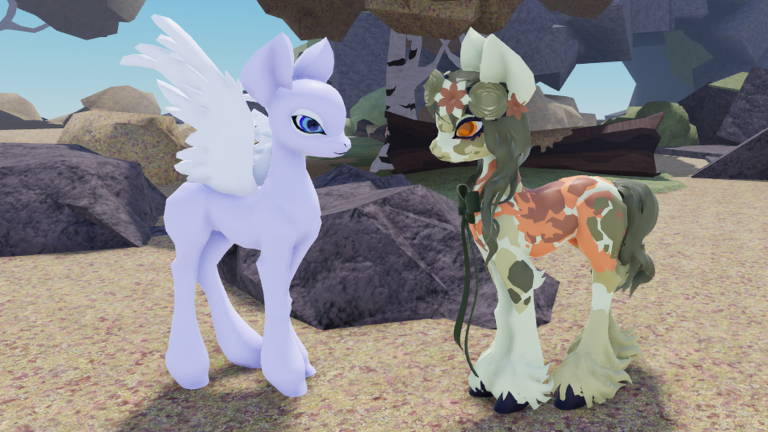
The Palette Planner is a text-first tool for Alicorns! Pony Land [BETA] players who want finished color stories before they burn dye materials. Use it to lock mane, tail, eye, coat, and accessory schemes, check contrast readability, and stage dye sessions without guessing in the editor. It complements the Customization Checklist (completion) and How to Customize (UI order). Execution details for recolors live in Dye Items; gather loops that feed pigments and crafts live in Flowers and Resources. Fashion inspiration—never mandatory rules—sits on the Looks Tier List.
Why plan colors on paper (or in notes) first
In a deep dress-up BETA it is easy to love a mane in isolation, then discover the coat eats the eyes, or that a metallic hat disappears against a bright crest. Planning offline forces you to answer five questions before you open dye UI:
- What is the base coat story?
- Do mane and tail match, echo, or intentionally contrast?
- Are eyes still readable at medium camera distance?
- Which one accent ties accessories together?
- Which materials do I still need to farm?
Write the answers once. Then the in-game session becomes execution, not panic shopping.
The five-zone palette worksheet
Copy this block into your notes and fill every line before dyeing Slot 1:
OC name / species:
Fantasy one-liner:
Coat base:
Coat secondary / pattern:
Mane primary:
Mane accent strand:
Tail primary:
Tail accent:
Eye iris:
Eye highlight:
Accessory metal / fabric:
Floral accent (if any):
Contrast check (pass/fail):
Dye materials still needed:
Save slot target (1 daily / 2 event / 3 WIP):
Leave no zone blank. “Undecided” is fine on Slot 3 WIP; it is not fine on the daily driver.
Contrast readability rules that actually help
Roblox lighting, mobile screens, and crowded plazas punish low contrast. Use these practical checks:
- Face first: Iris versus coat must differ enough that strangers see a gaze during emotes.
- Mane versus coat: If both are pastel clones, add a darker root, ribbon, or streak so the silhouette edge remains.
- Tail versus mane: Matching families look intentional; identical hex dumps can feel unfinished if density differs.
- Accessories versus mane: Metals need a slightly darker or brighter neighbor or they vanish in screenshots.
- Patterns: One strong marking family beats three muddy overlays fighting the mane.
Quick field test: zoom to a social distance, desaturate mentally (or squint). If the pony becomes a single blob, raise contrast on eyes or mane edge before farming more flowers.
Scheme archetypes (steal the structure, not the identity)
Use archetypes as scaffolds, then personalize:
Soft pastel RP partner
Coat light, mane one step richer, eyes medium-dark for warmth, accessories in pearl or soft gold, florals matching the mane accent. Excellent for Earth pony canvases and gentle Unicorn casters.
High-contrast show pony
Coat deep or graphic, mane bright with a sharp streak, eyes vivid, accessories limited but shiny. Works on Pegasus when wing dyes either match the coat or deliberately pop.
Earthy explorer
Coat muted greens/browns, mane dusty or sun-bleached, eyes amber or soft green, accessories leather-toned, florals sparse and seasonal. Patterns can carry more weight because there is no horn/wing noise.
Royal prestige prep (Alicorn-ready)
Coat elegant mid-tone, mane with controlled shimmer, eyes clear and bright, accessories sparse but regal, wing/horn plans noted early even if you are still on a starter species. Keep dye recipes that will still work when both horn and wings appear around level 50.
Browse the Looks Tier List only after you pick an archetype—tiers should inspire, not overwrite your OC sentence.
Dye planning without wasting mats
Translate the worksheet into a dye order that matches Dye Items:
- Coat regions first so patterns and accessories have a stable backdrop.
- Mane and tail second as a pair—never dye one and “hope” the other matches later.
- Eyes next if the BETA exposes separate eye color tools; re-check contrast.
- Accessories last so metals and fabrics answer the finished pony, not the reverse.
- Florals last of all using whatever Flowers and Resources currently feeds.
Run the first full dye story on a WIP save when possible. Port winners to the daily slot only after a walk-and-emote test. The Customization Checklist has explicit dye and flower sections—tick them after this planner is filled.
Accessory color discipline
Hats, bows, jewelry, and floral crowns should share one accent family with either the mane streak or the eye highlight. Two competing jewel tones usually muddy screenshots. If a headpiece fights a Unicorn horn or a Pegasus wing root, fix placement in How to Customize before blaming the palette.
Ask of every accessory:
- Does this color already exist somewhere on the pony?
- If I remove it, does the OC sentence still make sense?
- Will this metal still read after a night-time plaza screenshot?
If the answer is “no” twice, leave it in the WIP slot.
Session recipes
| Time | Planner focus | In-game action |
|---|---|---|
| 10 min | Fill worksheet only | No dyeing yet |
| 20 min | Coat + mane/tail | Dye WIP slot |
| 30 min | Eyes + one accessory accent | Emote test, screenshot |
| 45 min | Full story + florals | Port to event or daily slot |
| Post-patch | Re-validate contrast | Re-open saves after Updates |
Linking planner → checklist → editor
Ideal pipeline:
- Fill this Palette Planner worksheet.
- Open the Customization Checklist and mark which cosmetic slots still lack color decisions.
- Execute in the order from How to Customize.
- Pull materials via Flowers and Resources only for missing lines.
- Apply dye technique from Dye Items.
- Optional: compare silhouette flair on the Looks Tier List after the pony already reads clearly.
Skipping the planner usually means re-dyeing Slot 1 twice. Skipping the checklist usually means perfect colors on an unfinished accessory set. Do both.
BETA caveats
Faded Horizons can rename dye regions, add wing tint options, or change floral meshes. Your worksheet remains valuable: it records intent. After patches on Updates, re-run contrast checks and note which zones need a new material farm. Do not scrap a whole OC because one slider moved.
Related tools and guides
- Dye Items — recolor workflow and material mindset.
- How to Customize — editor categories and finishing order.
- Customization Checklist — full OC completion list.
- Flowers and Resources — gather loops for accents and crafts.
- Looks Tier List — subjective fashion rankings.
- Tools Hub — planner index.
Fill the five zones, protect contrast, dye with a shopping list, and your pony will read as a character—not a pile of pretty accidents.
Frequently Asked Questions
Quick answers to the most common questions.
What zones should every palette include?
Plan coat, mane, tail, eyes, and accessory accents together. Add florals if your OC uses them.
How do I check contrast quickly?
View at medium camera distance and squint. If the face or mane edge disappears, raise contrast before more dyeing.
Should I dye Slot 1 immediately?
Prefer testing full stories on a WIP slot, then port winners to your daily or event look.
Which pages pair with this planner?
Use Dye Items, How to Customize, the Customization Checklist, Flowers and Resources, and the Looks Tier List for inspiration.
Is this an in-game script?
No. It is a text planner only. Follow Roblox rules and keep executable script talk on the Scripts hub warnings.