Alicorns Pony Land How to Customize Your Pony
Master body, mane, patterns, accessories, animations, and three saves per species.
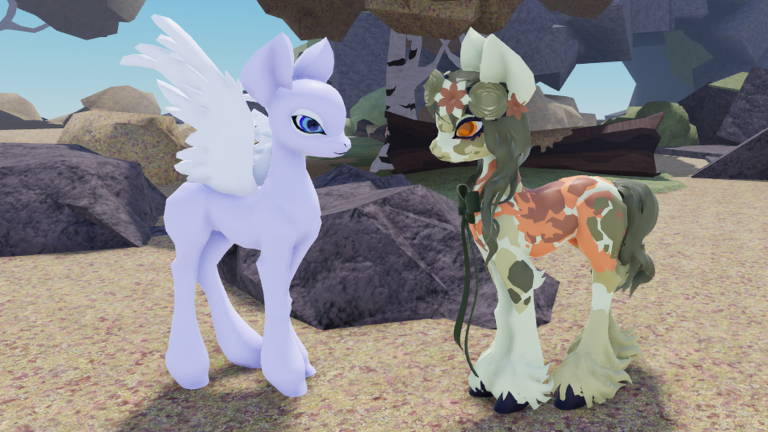
Customization is the reason most players stay in Alicorns! Pony Land [BETA]. The editor goes far beyond a single color slider: you shape body parts, eyes, manes, tails, patterns, accessories, and animations, then store multiple finished looks. This guide is the deep walkthrough after Getting Started.
Open the editor with a plan
Enter customization from the in-game menu once your pony has loaded. Before touching sliders, decide the fantasy you want: soft pastel RP partner, bold show pony, earthy explorer, or a reference to a favorite franchise silhouette. Write a one-line intent (“mint unicorn with dark eyes and ribboned mane”) so you do not random-walk every category.
Remember the species context. Unicorn, Pegasus, and Earth pony each frame accessories differently because horn and wing presence change the silhouette. Alicorn adds both horn and wings after unlock — design habits you learn now still apply when you graduate; see Unlock Alicorn.
Body parts and silhouette
Start with body. Adjust overall size, leg length, neck, and torso balance until the pony reads clearly from a social camera distance. Extreme proportions can look amazing in close-up and broken in crowded plazas — flip between close and far camera while you edit.
Keep symmetry unless you are intentionally creating an asymmetric RP character. Small changes stack: a slightly longer neck plus a taller body can turn a cute pony into an awkward giraffe if you are not careful. Save a checkpoint look before large body experiments.
Eyes and expression
Eyes carry personality. Cycle shapes first, then colors, then any highlight or specialty options the BETA exposes. High-contrast eyes help other players read your face during emotes; ultra-dark-on-dark schemes can disappear in night lighting.
Match eye energy to mane energy. Soft pastel manes usually pair better with gentle eye colors; sharp geometric manes can handle brighter irises. If the editor offers eye animations or blink styles, test them with an emote before locking the save.
Manes and tails
Manes and tails are where Pony Land looks become memorable. Browse styles, then tune length, volume, and color. Watch for clipping through the neck, wings (on Pegasus), or horn (on Unicorn). If a dramatic mane clips, try a shorter variant or reposition accessories instead of forcing the glamorous option.
Treat mane and tail as a pair. Mismatched density (huge mane, skinny tail, or the reverse) often looks unfinished. When you plan to dye later, pick styles with clean color regions — see Dye Items for recolor workflow.
Patterns and coat detail
Patterns add socks, spots, gradients, and coat markings that sell the character. Apply one strong pattern family before stacking three weak ones. Over-layering makes screenshots muddy and can hide body shape work you already did.
Use patterns to guide the eye toward the face or cutie-style focal points rather than covering every surface. If a pattern fights your mane color, change one side of the contrast instead of both — usually the pattern should be slightly quieter than the mane.
Accessories and finishing props
Accessories include bows, jewelry, floral pieces, thematic props, and other wearables unlocked or crafted through play. Add them late. A perfect body-plus-mane base makes accessory shopping faster because you can reject anything that breaks the silhouette.
Rules of thumb:
- One hero accessory beats five competing props.
- Match metal and fabric tones to the mane or eye accent color.
- Recheck wing and horn clearance after every accessory add.
- Remove anything you cannot justify in a single RP sentence.
Gather and craft loops feed rarer pieces. When you need materials, switch to Flowers and Resources instead of staring at empty shop shelves.
Animations and presentation
Animations and emotes are part of the look. Idle posture, walk flavor, and expressive emotes change how others experience your pony in a server. Test a short emote set after each major edit: greeting, cheer, shy, and sit if available.
If an animation clips with a huge mane or accessory, simplify the wearable rather than abandoning a favorite motion. Presentation matters as much as static screenshots in an RP-heavy BETA.
Save slots: three per species
Pony Land gives three save slots per species. That is nine look slots across Unicorn, Pegasus, and Earth pony before Alicorn enters the picture — use them deliberately:
- Slot 1 — daily driver / public RP look.
- Slot 2 — event, seasonal, or alternate palette.
- Slot 3 — laboratory for risky experiments.
Never experiment on slot 1 without copying the look elsewhere first. BETA patches can rearrange menus; a disciplined slot habit protects hours of work. After dyeing or crafting a new piece, decide which slot deserves it instead of overwriting everything.
A practical customize session (20–30 minutes)
- Load slot 1 and screenshot it for reference.
- Adjust body only if the silhouette feels wrong.
- Lock eyes, then mane/tail as a pair.
- Apply one pattern pass; stop if contrast is already strong.
- Add a single accessory; emote-test.
- Save. Move wild ideas to slot 3.
- If colors feel limited, gather materials and open Dye Items.
Species notes while customizing
- Unicorn — horn is a vertical focal point; tall head accessories compete with it.
- Pegasus — wings need lateral clearance; huge side props can collide.
- Earth pony — no horn/wings means coat and mane carry more of the identity — lean into patterns.
- Alicorn (later) — plan for both horn and wing clearance when you unlock it; many players rebuild slot 1 after the upgrade.
Compare priorities with community ranking notes on the Tier List once you understand what you personally like — tiers should never override your RP fantasy.
Quality checklist before you leave the editor
- Readable at medium camera distance.
- Mane/tail pair feels intentional.
- Pattern contrast supports the face.
- Accessories do not clip horn/wings.
- Emotes still look clean.
- Saved to the correct slot.
- Backup experiment parked in another slot.
Mastering customize turns every gather run and dye session into fuel for better looks. When you are ready for the prestige species fantasy, continue with Unlock Alicorn and keep this editor workflow — the tools stay the same even when the silhouette gains both horn and wings.
Frequently Asked Questions
Quick answers to the most common questions.
How many save slots does customization give me?
Three save slots per species. Keep a main look, an alternate, and an experimental slot so you never overwrite your favorite by accident.
What should I edit first: mane or body?
Lock a readable body silhouette first, then eyes, then mane and tail together. Accessories and heavy patterns come last.
Can I recolor pieces after saving a look?
Yes — dyeing is a separate workflow. See the Dye Items guide, and gather flowers or other resources when materials run low.
Do Unicorn, Pegasus, and Earth pony share the same editor?
The customize systems are shared in spirit, but horn and wing presence change clipping and accessory choices. Alicorn later adds both.
Why does my mane clip through accessories?
Usually the mane volume or accessory placement is too aggressive. Shorten the mane, swap the accessory, or test a different style before saving.