Getting Started in Alicorns Pony Land
Your first session checklist — species, inventory, looks, and exploration.
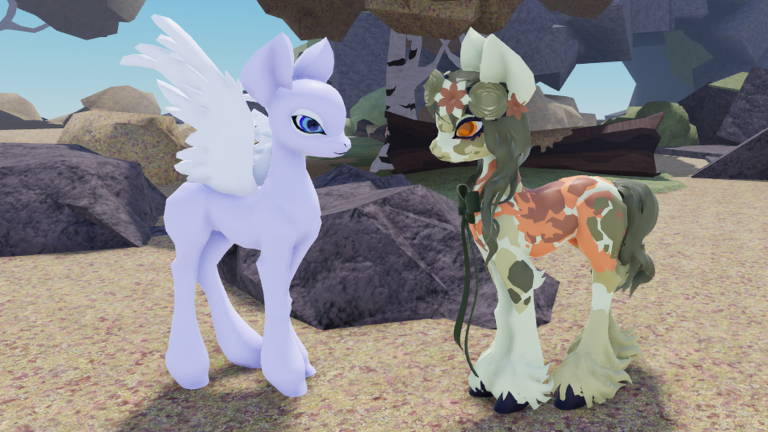
Alicorns! Pony Land [BETA] is a free Roblox experience from Faded Horizons focused on pony identity, deep customization, and gentle world play. This getting started guide walks a brand-new player from the Roblox join button through a clean first hour: choose a species, learn the UI, save a look, explore, gather, and leave knowing what to chase next.
Join the game cleanly
Open the official Roblox place for Alicorns Pony Land (place id associated with universe 10577992319) from the game page linked on this wiki. Wait for the full client load before mashing menus — BETA builds sometimes stream assets after you spawn. If friends are already in a server, join them only after you understand the species picker; otherwise start in a quiet server so you can learn without pressure.
Confirm you are in the correct title. The experience is MLP-inspired pony RP and customization, not a combat MMO. Expect social spaces, exploration, gathering, crafting, dyeing, emotes, and a long-term Alicorn goal rather than a ranked ladder.
Choose your first species
At character setup you pick among the three classic pony types:
- Unicorn — horn silhouette, magic-flavored fantasy looks.
- Pegasus — wings for the classic sky-pony vibe.
- Earth pony — grounded, sturdy presentation without horn or wings.
Alicorn (horn and wings) is not a day-one starter. Community progress points to an unlock around level 50. Treat your first species as a real main, not a throwaway: you get three save slots per species, so you can keep multiple looks once you learn How to Customize. If you already know you want Alicorn eventually, still pick the starter whose silhouette you enjoy wearing for dozens of hours — see Unlock Alicorn for the long game.
Learn movement and basic controls
Standard Roblox movement applies: WASD or stick to move, space to jump, camera drag to look around. On mobile, use the on-screen stick and jump button. Open the experience UI for emotes and any pony-specific actions the BETA exposes. Spend two minutes strafing, jumping, and rotating the camera so later customization screens do not feel cramped.
If a tutorial prompt appears, complete it before diving into shops or gather loops. Tutorials in BETA can move between patches; if a tip bubble is missing, follow this checklist instead and cross-check Updates after large patches.
Open inventory and claim early basics
Find the inventory or bag UI as soon as you spawn. Note how items stack, how cosmetics sit separately from gatherables, and whether the game highlights new rewards. Claim any starter gifts, welcome items, or onboarding rewards the moment they appear — unfinished claim flows are a common reason new players think they are missing content.
Also open any Codes entry point if the UI exposes one. As of November 2026 there are no widely confirmed active promo codes for this BETA, but knowing where the Codes UI lives saves time later. Full redemption notes live on the Codes hub.
First customization pass (keep it simple)
Customization is the star system. On your first visit, aim for a readable pony, not a maximalist collage:
- Set body proportions so the silhouette reads clearly at medium camera distance.
- Pick eye shape and color that match the personality you want to RP.
- Choose a mane and tail that do not clip wildly with your accessories.
- Add at most one or two accessories so you can evaluate the base.
- Save into slot 1 of your current species immediately.
Leave slots 2 and 3 empty or lightly used for experiments. Deep dives into patterns, animations, dyeing, and accessory layering belong in How to Customize and Dye Items. The goal of the first pass is a pony you are happy to walk around as while you learn the map.
Explore the world with a purpose
After saving a look, leave the mirror and walk. Learn landmarks, social hangouts, and gather spots. Flowers matter in Pony Land: they feed resource and crafting loops that support rarer items and recolors. Do not ignore them on day one — skim Flowers and Resources so you recognize what to pick up.
While exploring:
- Mark mentally where flowers and other nodes respawn.
- Try emotes near other players to learn social etiquette.
- Note crafting or dye stations if the map exposes them.
- Avoid spending limited currencies until you understand what is cosmetic versus progression.
Early progression mindset
XP and levels unlock more of the fantasy, culminating in Alicorn for many players. Early levels come from playing the intended loops: explore, gather, craft, socialize, and keep engaging with content the BETA currently rewards. Do not chase third-party auto-farm tools; they risk your Roblox account and are covered only as warnings on Scripts.
Set three soft goals for session two:
- Improve your slot-1 look with one new pattern or accessory.
- Complete a short gather run for flowers or crafting mats.
- Check whether any patch notes landed on Updates.
Common first-hour mistakes
- Overwriting your only good save because you never used a second slot.
- Ignoring flowers and then stalling on dye or craft recipes later.
- Quitting because Alicorn is locked — it is meant to be a milestone, not a tutorial reward.
- Redeeming random “codes” from unverified social posts — always verify on Codes.
- Skipping the official game page and group posts from Faded Horizons for BETA news.
What to read next
- How to Customize — full editor tour and save-slot strategy.
- Flowers and Resources — gather and craft loop.
- Dye Items — recolor workflow.
- Unlock Alicorn — level ~50 target and expectations.
- Guides Hub — full tutorial index.
- Codes — promo status and redemption habits.
Finish your first session with a saved pony, a little inventory, and a sense of the map. That foundation makes every later guide on this wiki faster to apply.
Frequently Asked Questions
Quick answers to the most common questions.
Can I start as an Alicorn in Alicorns Pony Land?
No. Starters are Unicorn, Pegasus, and Earth pony. Alicorn unlocks later — commonly reported around level 50. See Unlock Alicorn for details.
How many customization saves do I get?
You get three save slots per species. Use slot 1 for your daily look and keep experiments in the other slots.
What should I do in my first hour?
Pick a species, complete a simple customization, save it, explore landmarks, gather flowers or basic resources, and claim any starter rewards.
Where do I redeem codes?
Use the in-game Codes UI when it is available. Check the Codes hub before trying strings from social media — many posts are outdated or fake.
Is Alicorns Pony Land free to play?
Yes. It is a free-to-play Roblox BETA by Faded Horizons. Optional purchases may appear, but you can learn the core loops without them.